Improvements on LinkedIn web scraping agent
💡 This demo shows how a LinkedIn feed agent handles infinite scroll, lazy-loaded posts, and missing canonical URLs, then turns those posts into records that can be indexed and reused downstream.
See also: Building a Web Agent for Authenticated Job Feeds.
- Goal: make LinkedIn home-feed collection reliable enough for downstream retrieval
- Core shift: move from passive scraping to interaction-aware collection
Problem
- In an earlier experiment, the agent collected only a small subset of the posts visible in the browser.
- LinkedIn home feed is an infinite-scrolling, lazily loaded surface.
- Additional posts appear only after scrolling and interaction.
- Many lazy-loaded feed posts do not expose a permanent link through straightforward selectors.
- Without a canonical URL, posts are much harder to index, deduplicate, retrieve later, or hand off to downstream agents.
Why this matters
- Retrieval quality: posts without stable URLs are harder to store, rank, and fetch later.
- Agent usability: missing URLs weaken downstream workflows such as summarization, follow-up search, classification, and job-signal tracking.
- Information density: manual browsing and recommendation systems often miss the signals I care about most.
- Example: I missed an early-May hiring wave for Forward Deployed Engineer roles at top AI companies and only recognized the pattern after many openings had already closed.
- Collection quality matters more than raw token minimization when the output must be reusable.
Good to know: Tools vs. skills at a glance
- Choose tools when the agent needs to take concrete actions in the world: call APIs, query databases, write files, or interact with external systems.
- Choose skills when the agent needs reusable expertise that shapes how it approaches a task: domain heuristics, decision rules, workflow guidance, and tool-selection patterns.
- Use both in production systems: skills guide planning and judgment, while tools execute the actual work.
- A practical rule: use tools for execution and skills for domain-specific judgment.
- In this demo, sign-in, scrolling, link copying, and export fit best as tools; the logic for when to scroll again, when to resolve missing URLs, and how to validate collection quality fits better as a skill or agent routine.
What agents need to understand
- A missing URL does not mean the post is unimportant.
- The page is dynamic, and additional content appears only after interaction.
- Scrolling is part of extraction in addition just navigation.
- Some useful metadata must be resolved through UI actions such as opening menus or copying links.
- Robust collection requires page interaction, not just HTML parsing.
The agent must reason about browser behavior, not just page source.
Why common approaches were not enough
- Chat-based agents such as OpenClaw or Hermes Agent are not a natural fit for authenticated browser automation with tools like Playwright or Crawl4AI.
- Claude Code or Codex can run the workflow, but they are not designed to stay active in the background with persistent, autonomous collection.
- I also wanted to surface the live browser state during each run so I could observe exactly where collection quality broke down.
- For deployment and serving, orchestration, sandboxing, and task scheduling also matter; direct messaging alone is not enough.
Preparation
To make the workflow agent-friendly, I converted the Playwright/Crawl4AI flow into a CLI-style tool:
- Playwright and Crawl4AI behaviors are exposed through scripts and commands.
- Actions such as navigation, scrolling, clicking, and copying links can be triggered explicitly.
- Browser state and progress can be monitored from Claude Code through the CLI.
- This creates a cleaner separation between model reasoning and deterministic browser operations.
Development Process
- Observe the workflow lifecycle in browser (non-headless mode with Playwright and Crawl4AI)
- Write CLI tools with helper functions in Python (assisted by Claude Code) based on workflow break-down
- Refine, test and wrap the helper functions into an agent runnable from CLI
Solution
End-to-end flow
| Step | Module | What happens |
|---|---|---|
| 1. Auth preflight | linkedin_feed_agent.py · linkedin_auth.py |
When check_auth=True (default), opens the feed under profile lock and fails fast if the user is not signed in. |
| 2. Prepare feed | linkedin_feed_collect.py |
Uses one BrowserManager session to navigate, wait for mainFeed and lazy-mount hydration, sort by Recent (menu JS with ?feedType=recent fallback), then wait for cards to settle. |
| 3. Collect + resolve | linkedin_feed_collect.py |
Runs in-browser JS to scroll and extract lazy-mounted cards; uses inline Send → Copy link for author-only stubs when resolve_missing_urls=True (default). Falls back to HTML parsing plus scroll recovery if JS cannot find the feed container. |
| 3b. Dedupe | crawl4ai_linkedin_feed.py |
dedupe_feed_posts() collapses duplicate rows. |
| 4. Validate | / | arm_quality_metrics() measures how many records contain valid post_url permalinks. |
| 5. Export | linkedin_feed_agent.py |
Writes posts, valid_posts, quality, and params (collection_mode, sort_applied, sort_method, and more) into .export/. |
| (Entrance) | crawl4ai_linkedin_feed.py |
Opt-in (--use-crawl4ai): captures a virtual-scroll HTML snapshot for A/B testing. With resolve_missing_urls=False, crawl-only often returns zero useful posts. With resolution enabled, an empty crawl falls back to the live collection path above. |
Diagram
1 | flowchart LR |
Result
Skill “linkedin-sign-in”
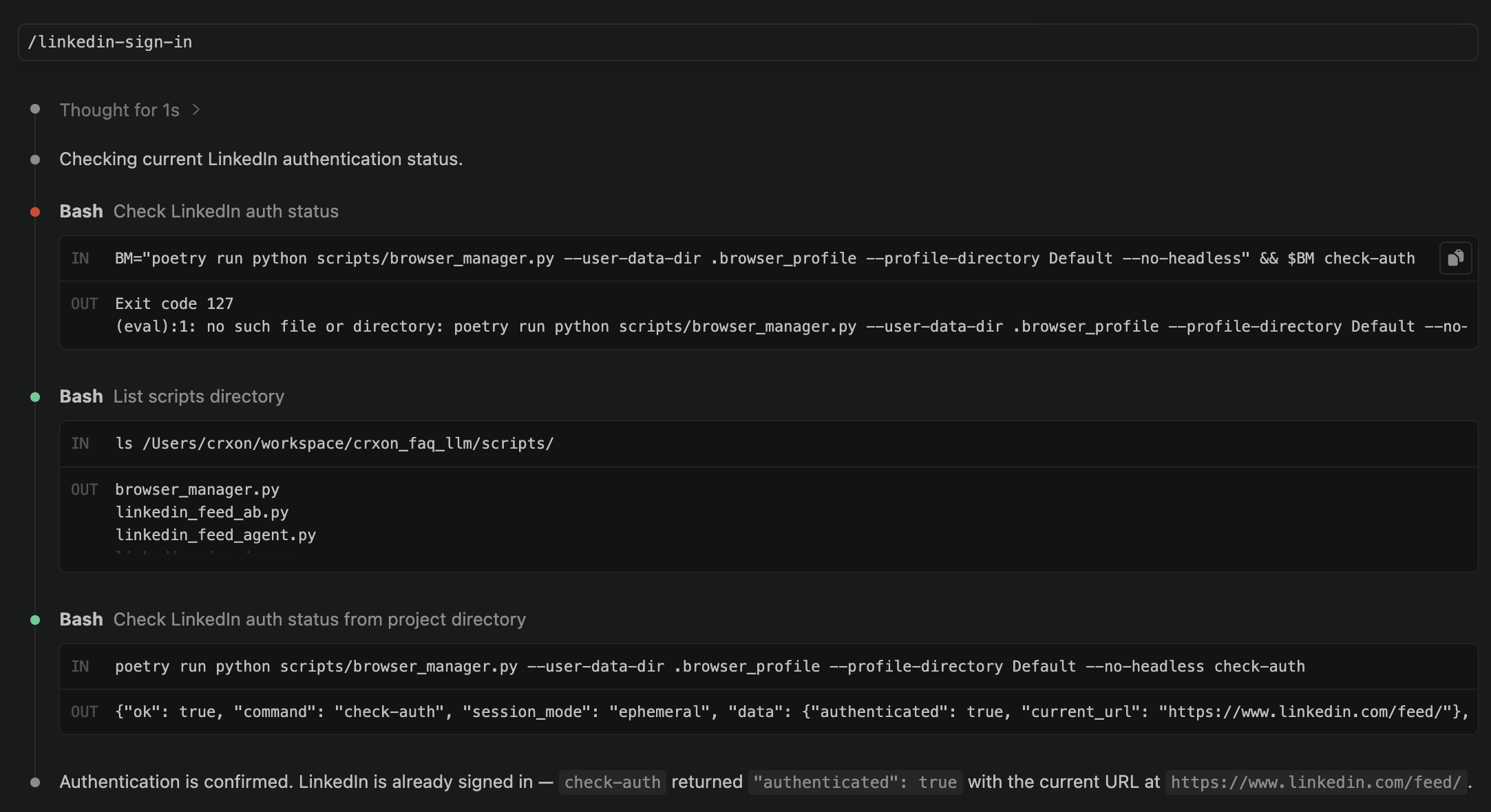
Agent run in CLI (make sign-in-linkedin)
1 | sign-in-linkedin: |

Skill “linkedin-feed-collect”
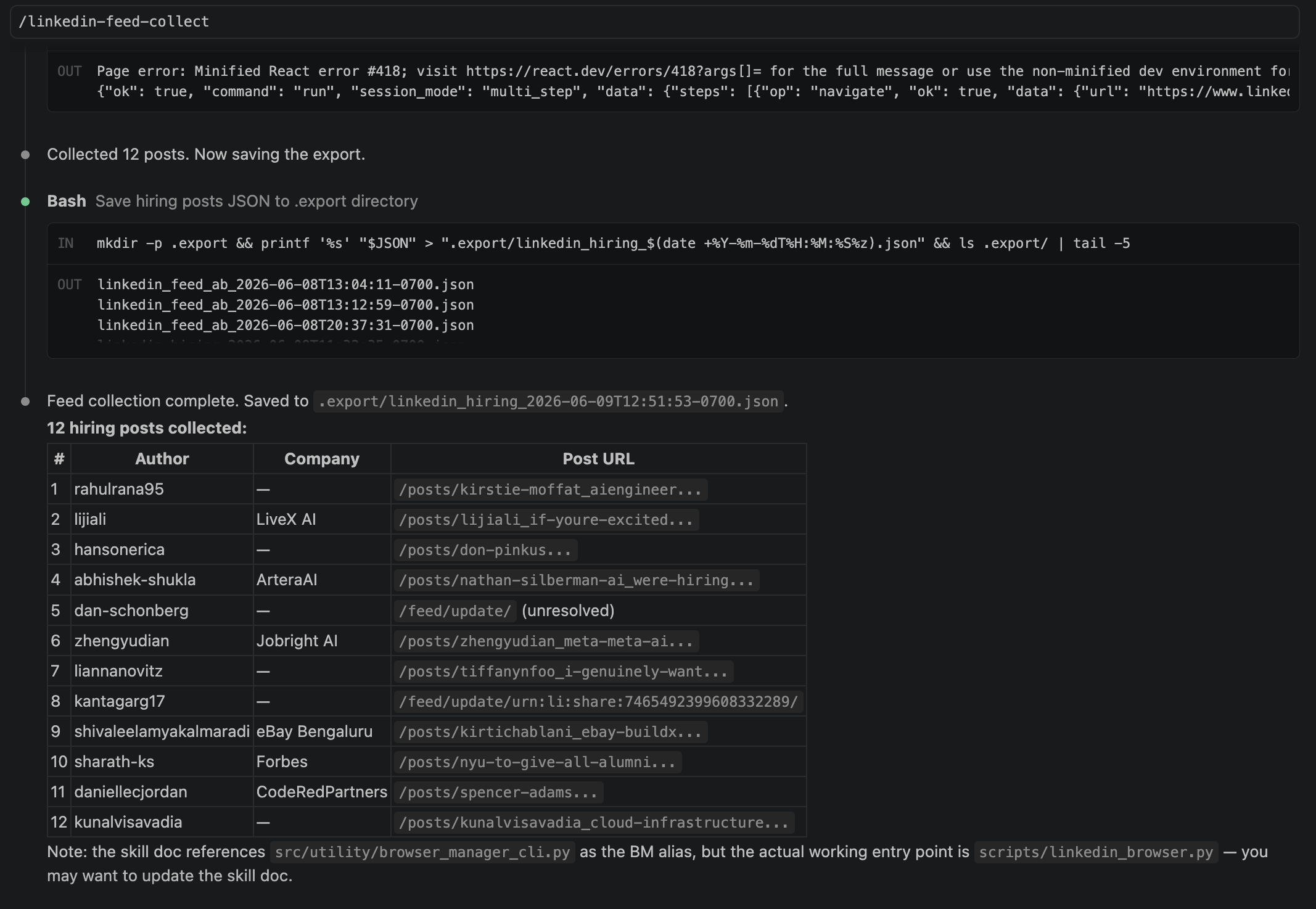
Agent run in CLI (make collect-linkedin-feed)
1 | collect-linkedin-feed: |
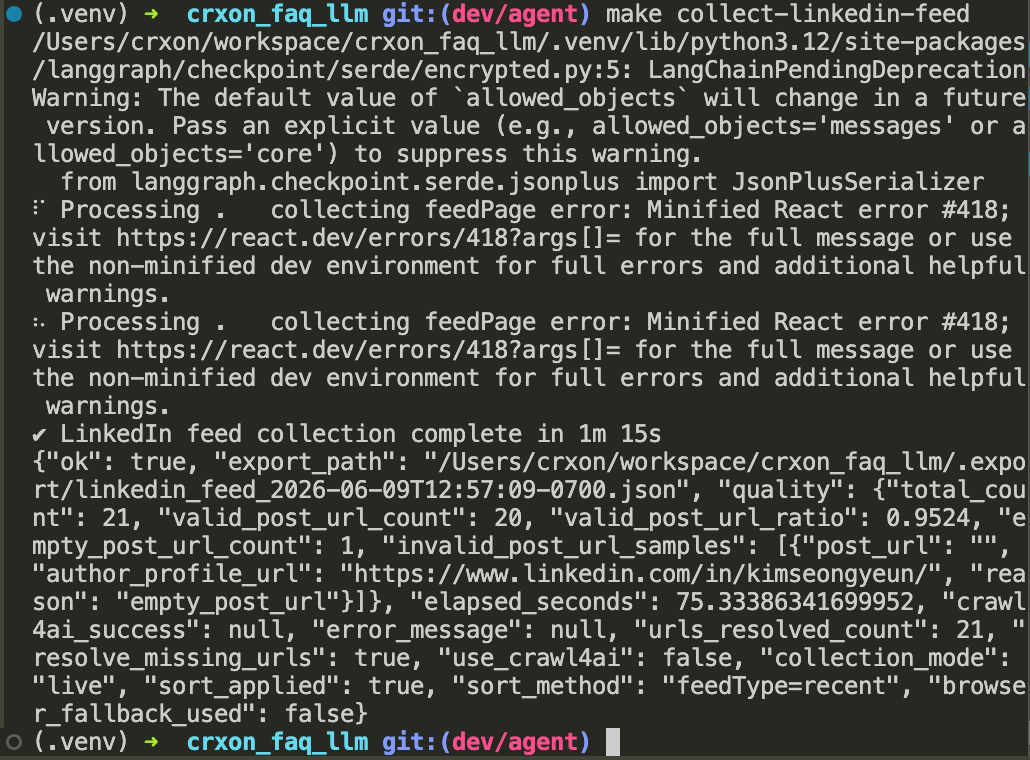
Demo takeaway
- A useful web agent cannot treat a dynamic feed like a static document.
- For LinkedIn home-feed collection, the agent must:
- understand lazy loading;
- interact with the page to reveal or resolve missing metadata;
- recover stable URLs for indexing;
- and produce outputs that are reusable for later retrieval, ranking, and downstream automation.
- The key shift is from passive scraping to interaction-aware collection.
Appendix
Improvements on LinkedIn web scraping agent